Four ways to solve the same problem now sit inside the SAP Business Technology Platform. SAP positions all four as complementary. The portfolio has moved fast, and one thing has not kept pace: a public demarcation of which tool suits which kind of workflow. Where Build Process Automation sits alongside the rest is the sharpest open question.
So every SAP CoE is working it out on its own, one project at a time. That is expensive, and it produces landscapes where the tool was picked by whoever happened to be in the room.
Nobody has written the neutral version of this. SAP cannot, because it sells the licences. n8n cannot, because SAP has held a stake in the company since May 2026. So here it is, from someone who builds on both.
One condition applies to a document like this: it only works if it also names the cases where n8n is the wrong answer. That section is further down, and it is not shortened.
The four tools, described honestly
n8n standalone. Workflow and agent orchestration outside SAP. Very large connector library, LLM nodes, human in the loop, fast to rebuild. Connects to SAP over OData, REST and RFC. Runs self-hosted or in n8n Cloud. No SAP contract required, which matters more than it sounds.
n8n inside Joule Studio. The same n8n as a managed environment on the SAP Business AI Platform, billed against existing BTP credits. Announced on 12 May 2026, GA targeted for Q3 2026. As of this writing it is not generally available. Requires BTP, and therefore RISE or GROW.
SAP Integration Suite. Governed enterprise integration: Cloud Integration, API Management, Event Mesh, and since Q2 2026 the MCP Gateway. Transport, central monitoring, SLA-grade operations. Mature.
SAP Build Process Automation. SAP-native processes with forms, approval chains, roles and the workflow inbox, plus RPA bots for interfaces without an API.
Joule assistants and agents. SAP's ready-made agents for standard processes. Over 200 agents and over 50 assistants announced at Sapphire in May 2026, rolling out over the following months. On ECC and on-premise S/4HANA they require a RISE commitment for the majority of the landscape plus a Max Success Plan. SAP has described this route as a transitional step while landscapes modernise, which is worth knowing before you plan around it.
Two things get mixed up in almost every conversation.
The MCP Gateway is not a data access path. It exposes curated SAP APIs to agents. It does not replace ODP and it is not an extraction route for volume. More on that below.
Joule Studio and Joule agents are different things. The ready-made agents are standard functionality. Joule Studio is the environment you build in.
The six questions
The choice is not decided by the tool. It is decided by six properties of the use case. Ask them in this order.
- What is the job? Moving data, running a process with people in it, making a decision, or operating a user interface. Four different jobs, four different answers.
- How critical is it? If it fails overnight, does a core process stop, or does nobody notice until Monday? Anything that halts a core process belongs in a tool with transport, monitoring and a named operations owner.
- How many non-SAP systems are involved? Zero or one argues for SAP-native tooling. From three upwards it tips hard towards n8n, because that is where a connection costs minutes instead of weeks.
- How often does the flow change? A process rebuilt twice a quarter is expensive in Integration Suite. A process unchanged for eight years does not belong in a tool optimised for fast rebuilds.
- Who builds it, and who operates it? The second half of that question is the one that gets skipped, and it is where agent sprawl comes from. If you cannot name an operator, do not build.
- What is the contract and landscape situation? ECC or on-premise without a RISE commitment rules out Joule and Joule Studio in practice. Existing BTP credits push the maths the other way.
The decision tree
Read it top down. The first question splits four ways, and three of those four are settled immediately.
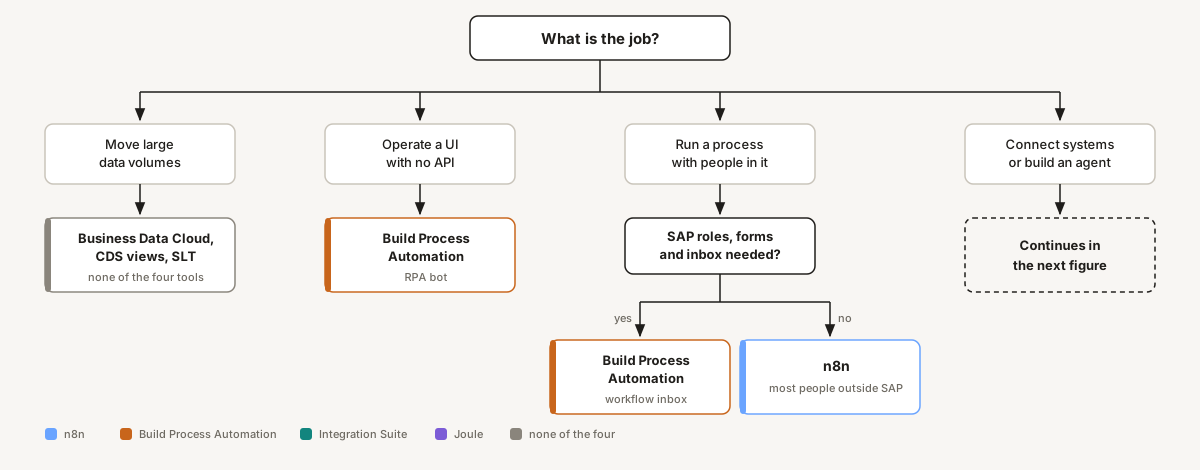
Is the job moving large volumes of data? Then it is none of the four. Business Data Cloud, CDS views or SLT. An orchestration tool is the wrong component, whichever one you pick.
Is the job operating an interface that has no API? Build Process Automation, RPA bot.
Is the job running a process with people in it? If it needs SAP roles, SAP forms and the workflow inbox, that is Build Process Automation. If most participants sit outside SAP, that is n8n.
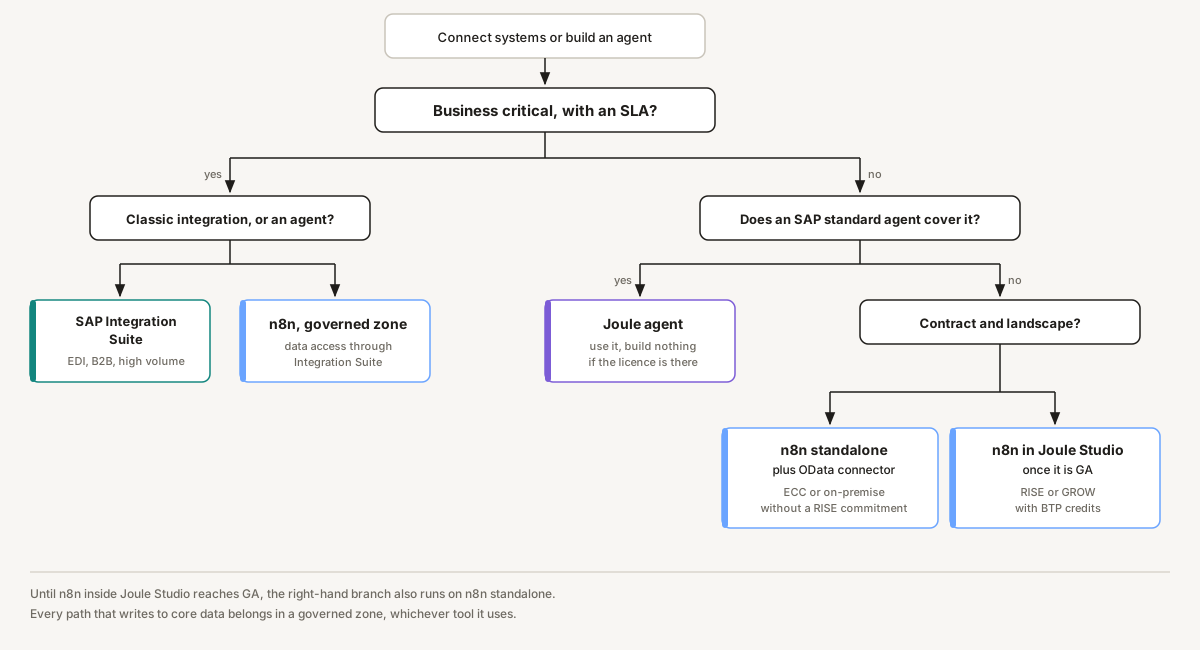
Is the job connecting systems or running an agent? Then ask whether it is business critical with an SLA.
If yes and it is classic integration, EDI, B2B or high volume: Integration Suite. If yes and it is an agent that makes decisions: n8n, in a governed zone, with data access through Integration Suite.
If not business critical, ask whether an SAP standard agent already covers the case. If it does and the licence is there, use it and build nothing.
If it does not, the contract situation decides. ECC or on-premise without a RISE commitment: n8n standalone with an OData connector. RISE or GROW with BTP credits available: n8n inside Joule Studio once it is GA, standalone until then.
Thirteen cases
| Use case | Tool | Why |
|---|---|---|
| Classify incoming invoices from mail and portals, pre-post in SAP | n8n | LLM step, several non-SAP sources, high rate of change |
| IDoc exchange with a logistics provider under a contractual SLA | Integration Suite | Critical, transport, monitoring, B2B standards |
| Leave request with approval chain and SAP roles | Build Process Automation | SAP-native roles and workflow inbox |
| Nightly replication of transactional data into the warehouse | Business Data Cloud or CDS | Volume. Not a job for an orchestrator |
| Cash application on a RISE landscape | Joule agent | SAP standard covers it. Rebuilding it burns money |
| Agent checks purchase requisitions across five systems and asks when something deviates | n8n | Many non-SAP systems, decision logic, human in the loop |
| Read an old portal with no API every day | Build Process Automation, RPA bot | Interface operation is what the bot is for |
| Expose curated SAP APIs to a third-party agent | Integration Suite, MCP Gateway | Exactly what the gateway is for |
| Onboarding across an HR tool, SAP, Active Directory and three SaaS systems | n8n | Six systems, five of them outside SAP |
| Real-time price lookup from a web shop against SAP | Integration Suite | Synchronous, critical, high volume |
| Weekly management report from SAP plus CRM plus spreadsheets | n8n | Not critical, many sources, changes constantly |
| Complaint handling with classification, credit note proposal and clerk approval | n8n, governed zone | Agent with a decision, but write access. Needs governance |
| Agent triages a claim, then hands settlement to an existing governed B2B route | n8n plus Integration Suite | Decision and enrichment in n8n, the committed route stays where it is |
When n8n is the wrong choice
Mass data replication. Millions of records a night belong in Business Data Cloud, CDS views or SLT. An orchestration tool is the wrong part, and that includes n8n.
Contractually committed B2B integration. EDI, IDoc routes with partners, penalties on failure. Integration Suite has transport, monitoring, error handling and an SAP support chain for exactly this. Do not rebuild it.
The case an SAP standard agent already covers to ninety percent. If the licence is there anyway, rebuilding is expensive and gets overtaken at the next release.
SAP-native approval processes. If users expect the task in their workflow inbox and SAP roles drive the authorisation, Build Process Automation is the shorter path.
When nobody will operate it. This is the most common failure. n8n makes building so cheap that six months later forty flows are running and none of them has an owner. At that point the tool is not the problem. The missing zone assignment is.
When the only reason is "we already have n8n". That is not an architecture decision.
When the answer is both
The decision tree asks which tool. For most cases that is the right question. But a growing share of flows are not one or the other, and forcing them to be produces the worst version of both.
The requisition agent that has to hand a settlement to a governed B2B route. The invoice flow that classifies in n8n and posts through an iFlow that has run for six years. Splitting those across two tools is not a compromise. It is the correct design, because each half sits where it belongs.
Today that composition is done by calling one from the other. n8n reaches a governed endpoint that Integration Suite exposes, over HTTPS, with the credential held in a vault. Integration Suite calls an n8n webhook. It works, and it is what we build. What it lacks is first-class support: no adapter in the palette, no discovery, no shared monitoring, and error handling written by hand on both sides.
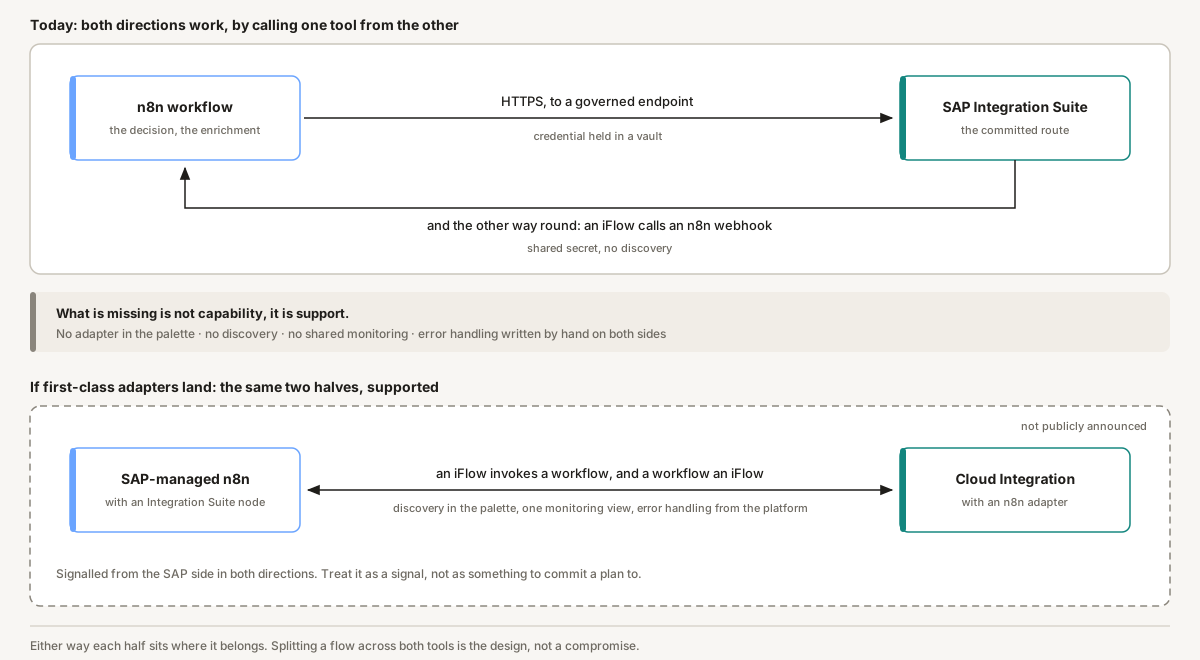
That may be about to change. Morten Wittrock of SAP added a dimension to this article that has had little coverage so far: an n8n adapter is coming to Cloud Integration, and an Integration Suite node to SAP-managed n8n, so that an iFlow can invoke an n8n workflow and the other way round. Neither is publicly announced at the time of writing, so treat it as a signal rather than something to commit a plan to.
If it lands, the composition above stops being integration work and becomes a design choice. The question in this article then shifts from which tool to which tool for which step. That is the better question anyway.
The data access underneath
The tool question is the second question. The first is how the data gets out at all, and that is where more changed in 2026 than in the tooling.
With note 3255746, SAP is moving away from ODP-RFC for transfers to non-SAP targets, in favour of protocols it considers more secure and more current. Since 9 June 2026 that shift is enforced technically through a security patch (note 3635619). An opt-out exists through note 3731818, at your own risk, and it expires at the end of 2026.
In practice: every route that pulls SAP data into a non-SAP target over ODP-RFC has to be rebuilt before year end. That covers a lot of extraction paths into warehouses and automation tooling.
What remains:
| Path | Good for | Limits |
|---|---|---|
| ODP OData | Delta-capable extraction, named by SAP as the successor | Performance at very high volume, setup effort |
| CDS views and table CDC | Modern S/4HANA landscapes | Not available in every ECC landscape |
| Business Data Cloud | Zero-copy, SAP's strategic direction | Licence and cloud commitment |
| MCP Gateway | Curated API exposure to agents | Not an extraction path. Different problem |
For n8n the route is ODP OData. We maintain an open-source OData node for n8n that handles V2 and V4, CSRF token handling for write operations, and catalogue discovery on on-premise systems. Disclosure: that node comes from us, and it is one option among several rather than the only one.
Whoever rebuilds their data access in the next four months is also deciding their automation tooling for the years after. Those two decisions are being made at the same time whether anyone frames them that way or not.
Three zones instead of one rule
Choosing the right tool does not prevent agent sprawl. What prevents it is assigning every flow to one of three zones, at creation time and not retroactively.
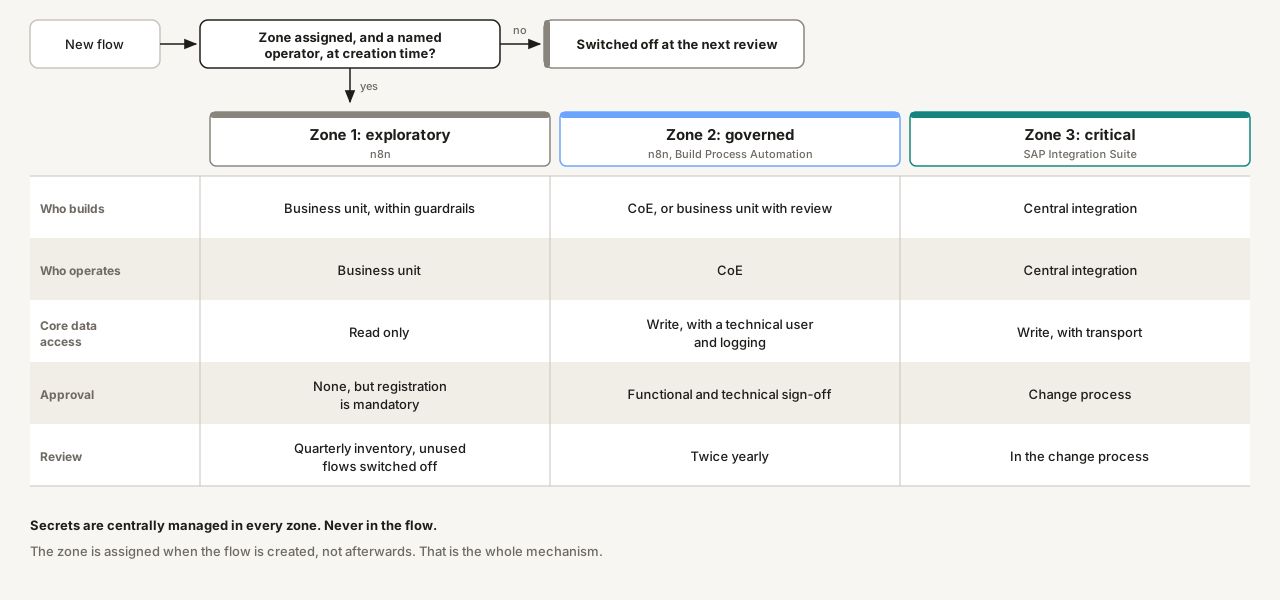
| Property | Zone 1: exploratory | Zone 2: governed | Zone 3: critical |
|---|---|---|---|
| Typical tools | n8n | n8n, Build Process Automation | Integration Suite |
| Who builds | Business unit, within guardrails | CoE, or business unit with review | Central integration |
| Who operates | Business unit | CoE | Central integration |
| Core data access | Read only | Write, with a technical user and logging | Write, with transport |
| Approval | None, but registration is mandatory | Functional and technical sign-off | Change process |
| Secrets | Centrally managed, never in the flow | Centrally managed | Centrally managed |
| Review | Quarterly inventory, unused flows switched off | Twice yearly | In the change process |
| SLA | None | Best effort, named contact | Contractual |
One hard rule holds it together: a flow with no zone and no named operator gets switched off. It is uncomfortable and it is the only mechanism that survives contact with reality.
What changes in the next twelve months
This is a snapshot, and the following will move it.
n8n inside Joule Studio goes GA, targeted for Q3 2026. After that, question six gets a different answer for RISE and GROW customers with BTP credits on hand. For ECC and on-premise without a RISE commitment, nothing changes.
The ODP opt-out expires at the end of 2026. After that the data access decision is made, voluntarily or not.
How Build Process Automation is positioned long term next to Joule's growing agent capabilities is still taking shape. Teams building heavily on it today should follow SAP's process orchestration roadmap rather than assume today's split holds.
The SAP AI Agent Hub is due to gain identity, observability and agent mining in Q3 2026. If that lands as announced, it shifts part of the governance question towards SAP-native tooling.
Interoperability between Integration Suite and SAP-managed n8n has been signalled from the SAP side, in both directions. Nothing is publicly announced yet. If it arrives, it changes the composition question more than it changes the tool question.
Most of the announced agents have not shipped yet. Check the case table against the current state before you rely on it.